> For the complete documentation index, see [llms.txt](https://ajuda.botconversa.com.br/llms.txt). Markdown versions of documentation pages are available by appending `.md` to page URLs; this page is available as [Markdown](https://ajuda.botconversa.com.br/tutoriais/retomar-atendimento-por-inatividade-do-cliente.md).
# Retomar Atendimento por Inatividade do Cliente
Com essa lógica você vai conseguir entrar em contato novamente com seu cliente caso ele não chegue ao final do seu fluxo.
## Conhecimentos Iniciais
Antes de iniciar a criação do seu fluxo, você precisa entender primeiro como faz para inscrever seus contatos em sequências.
{% embed url="" %}
## Fazendo a Lógica nos Fluxos
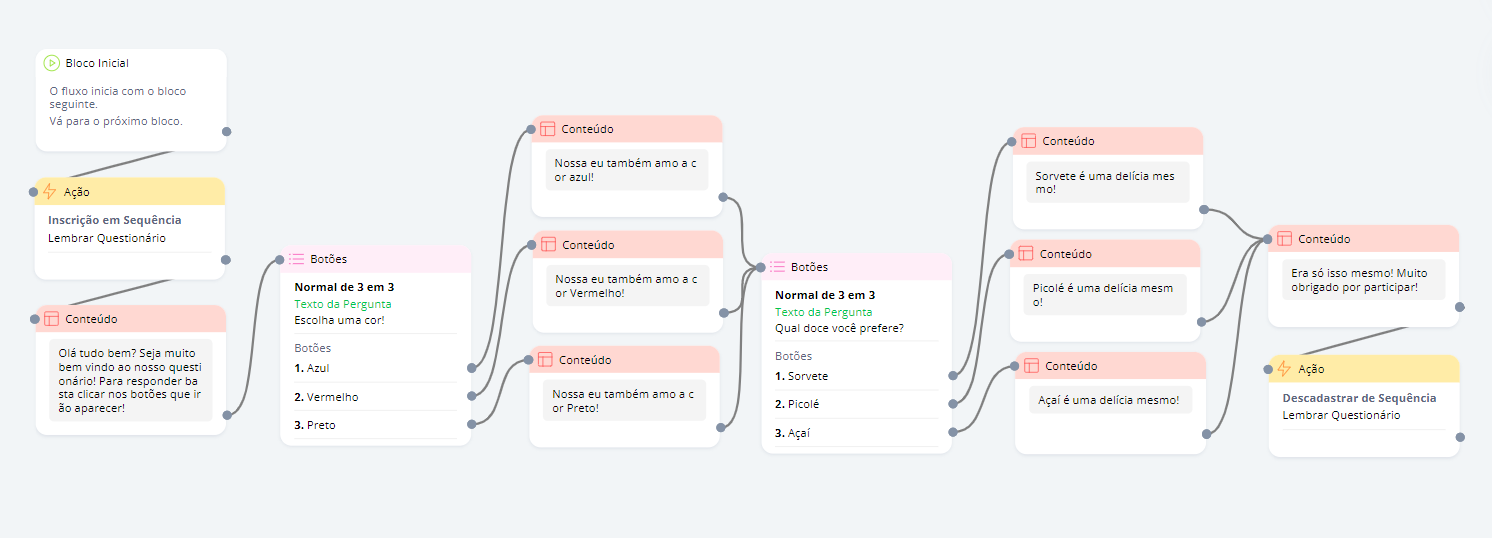
Use como base de lógica o fluxo da imagem abaixo, o fluxo pronto está mais abaixo
QUESTIONÁRIO (Fluxo Principal)
{% hint style="info" %}
O importante desse fluxo é entender como faz a lógica de retomar atendimento. Se atente aos blocos de ação no inicio de no final do fluxo.
{% endhint %}
{% hint style="warning" %}
Se atente ao tempo que a pessoa pode demorar para concluir o fluxo para que as mensagens de inatividade não sejam enviadas enquanto a pessoa ainda está terminando o fluxo.
{% endhint %}
{% hint style="info" %}
O fluxo mostrado acima e o que você irá baixar, não é exatamente igual ao mostrado no vídeo. No entanto, a lógica de integração continua a mesma
{% endhint %}
## Explicando a Lógica
* Caso a pessoa não termine o fluxo dentro do delay programado na sequência, significa que seu conato abandonou o fluxo, sendo assim, ao final do tempo será enviado os fluxos programados na sequência que você criou.
* Caso a pessoa conclua o fluxo ela não receberá as mensagens da sequência.
## AULAS EXPLICATIVAS
**COMO CRIAR FLUXO DE INATIVIDADE**\
## FLUXOS PRONTOS
**QUESTIONÁRIO (Fluxo Principal)**
**RETOMAR QUESTIONÁRIO- 1 (1° fluxo da sequência)**
**RETOMAR QUESTIONÁRIO- 2 (2° fluxo da sequência)**
---
# Agent Instructions
This documentation is published with GitBook. GitBook is the documentation platform designed so that both humans and AI agents can read, navigate, and reason over technical content effectively. Learn more at gitbook.com.
## Querying This Documentation
If you need additional information that is not directly available in this page, you can query the documentation dynamically by asking a question.
Perform an HTTP GET request on the current page URL with the `ask` query parameter, and the optional `goal` query parameter:
```
GET https://ajuda.botconversa.com.br/tutoriais/retomar-atendimento-por-inatividade-do-cliente.md?ask=&goal=
```
`ask` is the immediate question: it should be specific, self-contained, and written in natural language.
`goal` is optional and describes the broader end goal you are ultimately trying to accomplish on behalf of the user. GitBook uses it to tailor the answer towards what is most useful for that goal.
The response will contain a direct answer to the question and relevant excerpts and sources from the documentation.
Use this mechanism when the answer is not explicitly present in the current page, you need clarification or additional context, or you want to retrieve related documentation sections.